
Scope 26.4 brings new features, enhancements, and a contemporary interface. This release report will guide you through the significant updates crafted to transform your workflow.
General
New Smart ‘Whitelist’ feature for Denied Party Screening
Discover the improved existing ‘Good Guy’ feature mechanic with a smarter process. Major advantages over ‘Good Guy’ are continued automated checking of whitelisted addresses and no need to manually re-check the same address with same match result after some days. Re-checking is limited to changes in address or changes with matches on denied party lists. Find more information in our Knowledge Base.
Air
Airline Messaging Premium – automatic, timely and complete tracking events
Are you still looking for event data manually? Most freight forwarders invest valuable time manually, adding important milestones for shipment tracking. This process is error-prone, delayed, time-consuming, staff dependent, and associated with high labor costs. In short: inefficient.
The new Airline Messaging Premium in Scope provides you with event data automatically. Our new Premium Feature covers +200 airlines and subscribes to real-time events by storing the IATA AWB number (also fully available to non-IATA forwarders) for: Master shipments, Back-to-back shipments and Direct shipments. Applicable for: air import, air export and simple shipments air
Are you interested in activating this feature? Send an email to sales@riege.com to recieve a personal quote and discover all benefits.
Ocean
Discover a new transport order type
Discover a new transport order type. “Delivery to branch” gives users the choice to handle the first part of the haulage from the CFS (= default pickup address) to the freight forwarders warehouse (= default delivery address) without triggering wrong events for final cargo delivery.
Finance
Enhancements in Accounts Payable Import
Various improvements have been made to the AP Import appliance and are ready to be discovered:
-
Invoices intended for processing in an external system must be marked as Not for Scope using the context action Process externally in the AP Import editor. This action is now also available on the AP Import overview, allowing users to download invoices and update the status of multiple invoices at once.
-
AP Import entries intended for processing in an external system, or where this classification is still pending, previously required a dedicated permission to be visible. To improve transparency and usability, all users with access to the AP Import overview can now see all entries.
-
Depending on the entry status and the user’s permissions, some information may be restricted. Entries for which a user lacks permission are displayed on overview in a greyed‑out state; sensitive information is hidden, and these entries cannot be opened, downloaded or deleted.
-
The AP Import overview now includes a preview area that shows selected invoice details, provided the user has permission to view all invoice details.

-
Invoice attachments associated with an AP Import entry are now assigned a specific MIME type, making them easier to identify as invoice-related files.
-
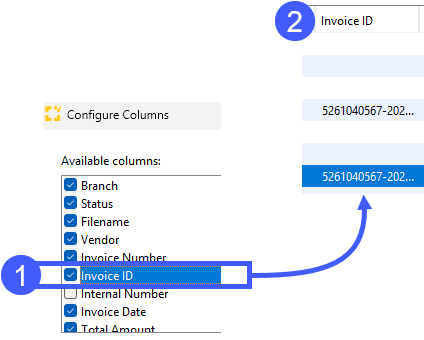
The AP Import overview now shows the tax authority invoice ID for invoices received via the KSeF integration with the Polish tax authority.
BECOMING A DIGITAL FREIGHT FORWARDER WITH SCOPE
Make your processes more efficient and digital with Scope 26.4. Discover now how our friendly software can optimize your processes and drive your company forward.
Read the detailed Release Report on Scope 26.4 and take a look at the Changelog in our Scope Knowledge Base.